GTA 6 Loading Screen AI: Grey Parking-Lot Snap In, Painted Poster Out
The poster repaints your face and clothes, so they need to be big and clear: fix your photo in PhotoCraft, crop it upright, and the clip freezes it and paints it as a sunset poster.
Pick a starting scene. It fills the prompt, model, ratio and duration below; edit anything, check the credit quote, then generate.
Fix the photo in the editor first: level it, crop to 9:16 from the head to the waist, brighten it and warm a grey day, then Export and upload the image here. Open the editor in a new tab
Preset: Sedan Poster · filled in for you
Your clip appears hereAbove: what this preset made in our sample. Yours keeps your own still.
AI content needs review. Use only photos and prompts you have permission to process, and never upload a stranger or a child. Image references are uploaded through our server to KIE only when you submit. Results use temporary provider links. Privacy & retention · Credit rules.
GTA 6 loading screen AI from a grey parking-lot snap
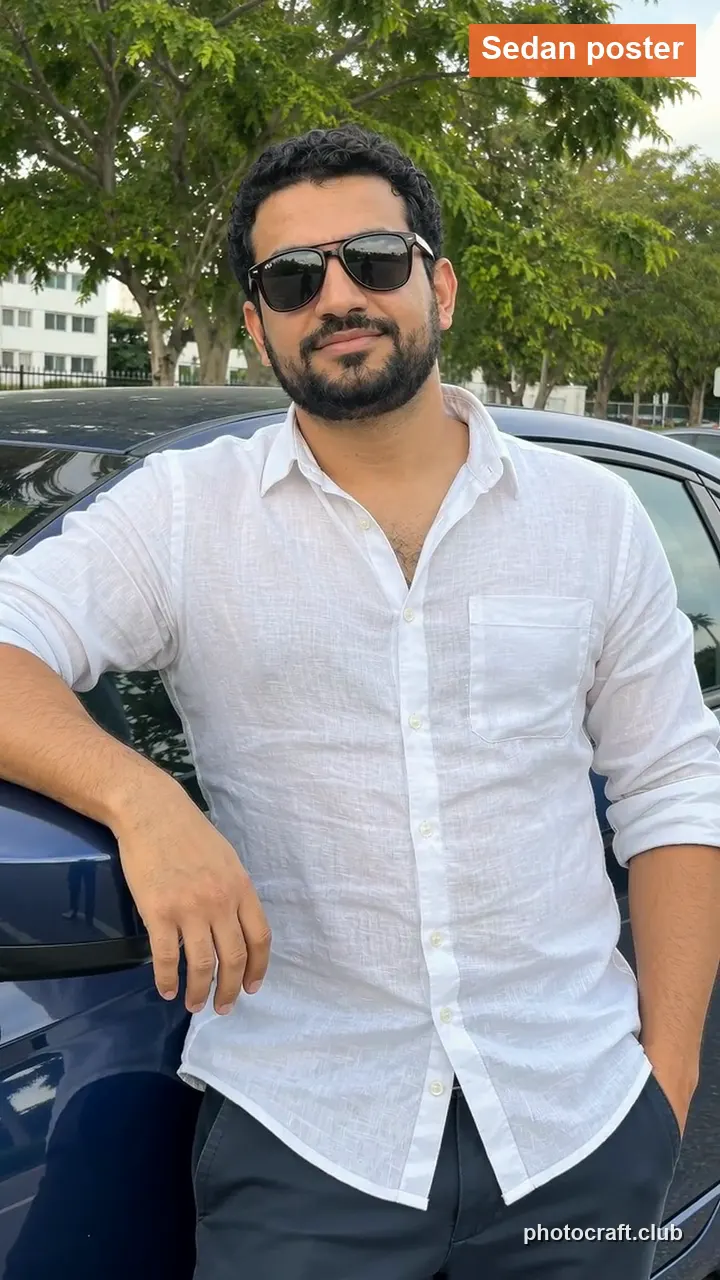
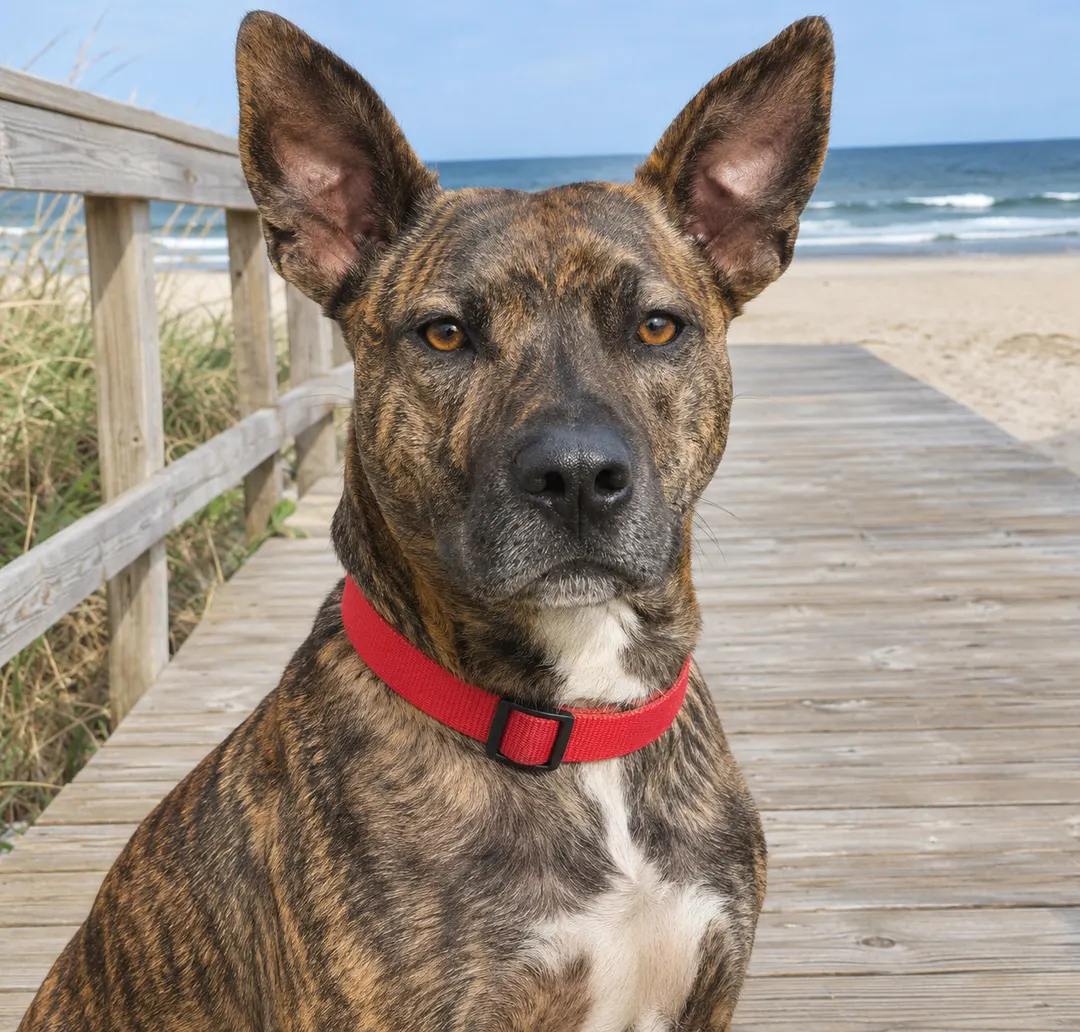
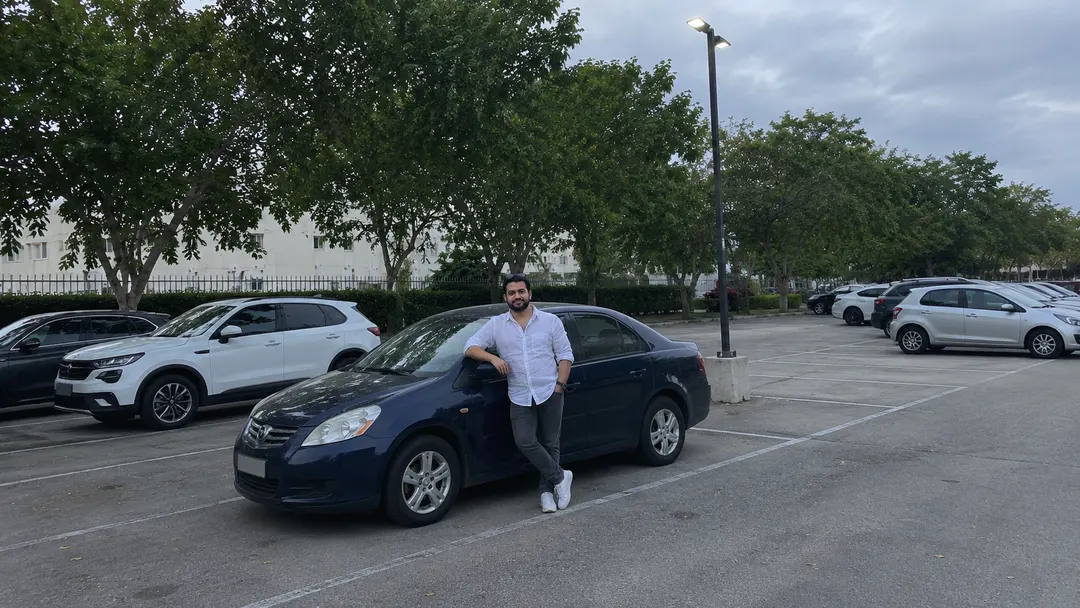
A daylight photo of an original man by a dark blue sedan and a 9-second clip that freezes him and paints him into a sunset poster; a brindle dog gets the second card. The far-off parking-lot snap of the same man, next to the cropped photo, is in the comparison below.
PhotoClip · 9 sec
Sedan poster
An original man in a white linen shirt slides his sunglasses down and leans on a dark blue sedan in daylight; about four seconds in the frame flashes white and turns into a hand-painted poster with thick black outlines, an orange-pink sunset, palm trees and a coastal skyline, which holds as the camera pushes in. Original synthwave instrumental, no lyrics. Input requirement: one sharp, bright upright photo of one person from the head to the waist, or one dog with its whole face in view.
Sample clip made with Seedance 2.0 Fast (9 s, 9:16 vertical, 720p, audio on) from a real photo as the first frame and a painted poster made with an image model as the last frame; the presets on this page take one photo.Use the Sedan Poster preset
PhotoClip · 9 sec
Dog poster
An original brindle dog in a red collar sits on a beach boardwalk and looks into the lens; at about three seconds the frame flashes white and black outlines sweep in, and from about five seconds it is a painted poster with small dark sunglasses, a magenta-and-orange sunset, palm trees and pastel beachfront buildings. Original synthwave instrumental, no lyrics. Input requirement: one sharp, bright upright photo of one person from the head to the waist, or one dog with its whole face in view.
Sample clip made with Seedance 2.0 Fast (9 s, 9:16 vertical, 720p, audio on) from a real photo as the first frame and a painted poster made with an image model as the last frame; the presets on this page take one photo.Use the Dog Poster preset
Why the GTA 6 loading screen AI needs you big in the frame
The painting is built from your face, beard, hair and shirt; when you are a small figure across a parking lot, the model guesses those details and the poster stops looking like you.
Face and clothes carry the likeness
The repaint keeps your pose and outfit and redraws everything else: sky, palms, skyline. Thick outlines and flat colour simplify a face, so the eyes, brows and beard need to be sharp in the photo to survive. A clear face and good light matter more than the background, which gets painted over anyway. If the background is busy, clean up the background first with Image to Image.
A small figure turns into a stranger
In a wide snap you are a small part of the frame. The clip fills the vertical frame with you, so a small, soft face gets enlarged before it is painted, and the poster ends up with someone who only wears your shirt. One person per photo, no sunglasses over the eyes (regular glasses are fine), and a pose such as leaning on the car or crossing your arms.
Fix your photo for the GTA 6 loading screen AI in PhotoCraft
Open the snapshot in PhotoCraft, level the horizon, crop to 9:16 from the top of your head to the waist, lift the brightness, warm the cold grey cast and Export.
Before Snap: wide frame, overcast light, the man small next to the car.After A separate, brighter photo of the same man, cropped to 9:16.
Still only Both images were made with an image model on November 26, 2026 to show the fixes above: the left is a far-off snapshot on a grey day, the right a separate, brighter photo of the same man cropped to 9:16. Neither was exported from the PhotoCraft editor.
Level and crop to 9:16
Straighten and crop the photo in the editor before anything else. A tilted horizon becomes a tilted skyline in the poster, and the clip is vertical, so a wide car-park frame leaves you small in the middle.
Head to waist in frame
Leave a little space above your head and cut at the waist or hips. That puts your face in the top third and keeps the shirt and arms the repaint works from.
Warm up a grey day
Overcast light makes skin look grey and the poster's sunset will not fix that. Lift the brightness, add a little warmth and contrast, and keep the white of a shirt from blowing out.
GTA 6 loading screen AI origins and the fan-made label
Per peer page, it started with a CapCut template whose sound appeared on 27 August 2026 and grew in November before the 19 November launch; what you make here is unofficial fan art with no logo or game characters.
How the trend started
Painted character art has been part of the series' loading screens for over 20 years, and in 2025 people began asking AI image tools for a portrait in that style. On TikTok, a CapCut template titled "Your GTA 6 loading screen" carried it: its sound appeared on August 27, 2026, a post of 198,100 views followed on November 10, and by November 15 the sound had 8,931 videos (per one peer page). Another peer page says the wave came in launch week, after the game came out on November 19. People also call it the GTA 6 filter, the GTA character filter or the GTA poster effect.
What makes it fan-made
The title line and logo in the original posts came from the template, not from the AI picture. Clips made here are unofficial and fan-made: no title, no logo, no on-screen game interface or map, no game characters, and nothing here comes from or is endorsed by the game's publisher. Keep the AI label on when you post.
GTA 6 loading screen AI from fixed photo to painted clip
Drop the fixed photo on the workbench, pick Sedan Poster or Dog Poster, render once and save the ten-second clip as MP4.
1
Fixed photo in
Level, crop to 9:16 from the head to the waist and brighten the photo in the PhotoCraft online editor, then Export. If you only want the poster, make the poster as a still with Image to Image; the painted end frames of the samples were made that way with an image model.
Check the credit quote on the button and press generate. The loading-screen trend grew through November, around the game's November 19, 2026 release; your clip is unofficial fan art with its own original music.
The prompt behind it describes a moment of real movement, a white-flash freeze and a stroke-by-stroke repaint into a sunset poster that holds while the camera pushes in.
Use the photo as the first frame; the person keeps the exact face, hair, skin tone and the clothes from the photo in every frame. 0-1.5 s: real handheld phone footage with one small natural movement, such as sliding sunglasses down or leaning on the car, warm daylight. 1.5-2.5 s: the motion freezes on a still pose and the frame flashes white. 2.5-5 s: the frozen frame transforms, brush stroke by brush stroke, into a hand-painted crime-game loading-screen illustration of the same person with thick black outlines, flat cel shading, a saturated orange-pink sunset, palm tree silhouettes and a coastal skyline. 5-10 s: the finished painted poster holds with a slow push-in, palm leaves swaying slightly and the sunset glow pulsing. Sound: an original laid-back synthwave instrumental with a whoosh at the freeze; no lyrics, no existing song. No title text, no game logo, no HUD, no game characters. No text, no logos.
This GTA 6 loading screen AI prompt asks for the freeze at 1.5 seconds; in the sample the model held the real footage for about four seconds before the flash, so the timings below are what the clip shows. Each run is a new take, and the flash can land earlier or later.
No title, no logo
"No title text, no game logo, no HUD, no game characters" keeps the poster a generic sunset illustration. It names no city, character or studio, so the clip stays fan art of you.
GTA 6 loading screen AI questions
Why fix the photo before the loading screen clip?
The clip repaints your face and clothes as a poster, so they have to be big and clear to begin with; a far-off, grey snapshot gives a painted stranger.
My only photo is a far-off, grey parking-lot snap. Will it work?
Fix it first: straighten the horizon, crop upright to 9:16 so you fill the frame from head to waist, lift the brightness and warm the cold cast in the PhotoCraft online editor, then Export.
Can I use a photo of my dog?
Yes. Pick Dog Poster and upload one dog with its whole face in view; the painted version keeps its markings and adds small dark sunglasses.
Is this the GTA 6 filter from TikTok?
It makes the same kind of photo-to-poster clip, but a GTA 6 loading screen AI clip made here is unofficial and fan-made, with no template title, no game logo and nothing from the game's publisher.
What does one loading screen clip cost?
The presets use Seedance 2 Mini at 480p for 10 seconds, and the button shows the exact credits before you render. Credits come in one-time credit packs; there is no monthly plan.
After the gta 6 loading screen ai: more AI video effects